
# Tag Management
Many users will accumulate a large number of tags so we have built extensive tools for managing those tags.
# Viewing All Your Tags
When you first log onto https://tagger.mobi, you will be presented with a list of all of your tags. Also, anytime you are logged in and viewing a tag, all the tags you own will be shown below the details of the currently selected tag. Clicking on a tag in the list will display its details at the top of the screen, replacing any previously selected tag.
Below is a picture of the simplest possible case - a list containing just a single tag with the title 'Sample Tag'.
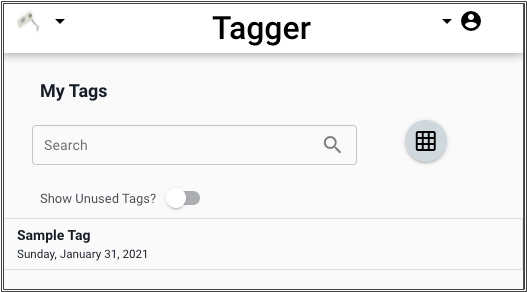
Note the grid icon.

You tags can be displayed as a list or as a grid. Clicking on this icon toggles between list and grid modes.
When being displayed as a grid, the tags look something like this:
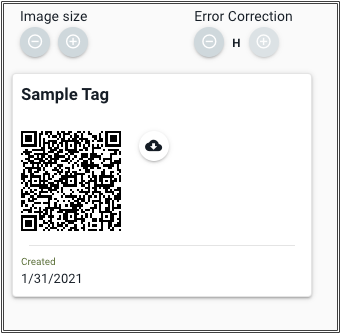
Viewing your tags as a grid presents a QR Code that can be printed. If you ever need to print a Tagger Tag, this is where you do it.
# Printing Tags
The two variables for creating a QR tag are the size of the tag and the level of error correction level. Use the + and - buttons to adjust the size and error correction level.
Tag Size
The larger a tag is, the easier it will be read. The higher the level of error correction used, the less likely the tag will be to give errors but it may also be harder to scan because there will be more pixels. In practice, we find that a tag that is about 1" square with M (medium) error correction gives a nice tradeoff between being easy to scan but not being too large.
Click on the download button to download the QR Code as a PDF. The document will probabaly open in a new browser window with the tag in the lower left corner of the document.
Printing Tags
If you don't have a way to print labels, print the tag on plain paper and use transparent tape to mount it wherever you wish.
# Searching Tags
Tags can be searched quickly and easily by typing a search term into the search box. Tagger searchs the name of each tag and the text of any notes. The contents of attachments to a tag are not searched..

Click on the X inside the search box to erase the search term and show all the tags.
Hashtags
Hastags are a great way to organize tags and make them easily searchable.