
# User Settings
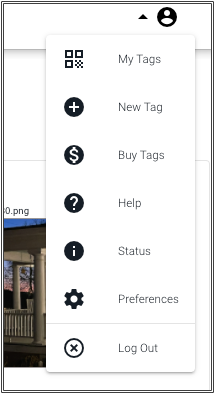
Once successfully logged in, the login button in the upper right becomes the User button. Click on that button to show the User menu.
# My Tags
Clicking on the My Tags link will display the list of your tags.
# New Tag
Clicking on the New Tag link will immediately create a new tag and add it to the list of tags you own.
Tag Limits
Different Tagger accounts are allowed to create a different number of tags. If you receive an error that your account is not authorized to create more tags, check your account status.
# Buy Tags
Use Buy Tags to purchase pre-printed tags directly from Tagger or get the ability to create and print more tags of your own. You can also check your tag count and storage limitations and the overall status of your account.
# Help
The help link brings you to this documentation system.
# Status
Click on the status link to display a short summary of the status of the Tagger system. If there is an outage, it will be noted here.
# Preferences
Tagger system preferences are set here. The only currently supported Tagger preference is to enable Dark Mode.
# Logout
Logout logs you out of the Tagger system.